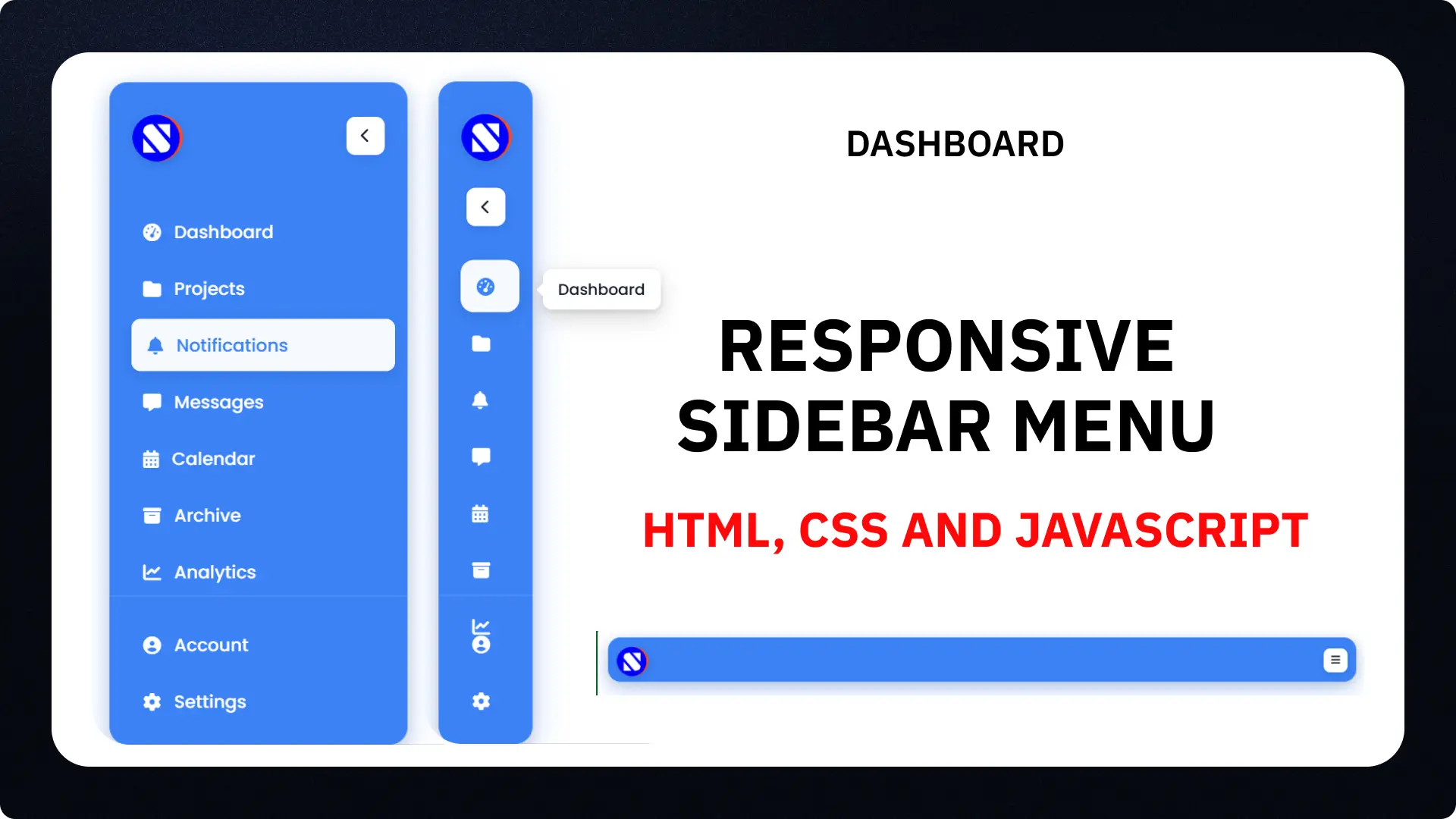
You want to create a clean navigation system for your website. A responsive sidebar menu fits the bill. It adjusts to different screen sizes, stays user-friendly on mobiles, and looks sharp on desktops. I built this one for my latest YouTube tutorial video, and I’ll walk you through it here. Grab the code, tweak it, and deploy it on your site.
This setup uses basic HTML for structure, CSS for styles and responsiveness, and a touch of JavaScript for toggles. No frameworks needed just pure code. Let’s dive in.
Why You Need a Responsive Sidebar
You see sidebars everywhere in dashboards and apps. They organize links without cluttering the main content. But if your sidebar breaks on phones, users bounce fast.
The Rise of Mobile-First Design
Mobile traffic dominates now. Statista reports that in 2024, mobile devices drove 58.67% of global web visits, up from 56% in 2023. Projections for 2025 show it hitting 60%, per SimilarWeb trends. You can’t ignore that. A responsive sidebar ensures smooth navigation across devices, cutting load times and boosting engagement.
Key Benefits for Your Site
This menu collapses on small screens, shows tooltips on hover, and includes icons for quick recognition. Users find what they need faster. As web designer Ethan Marcotte puts it, “Responsive design isn’t about devices; it’s about people.” Build for real users, and your site performs better.
HTML Structure: Lay the Foundation
Start with the bones. The HTML sets up the sidebar, header, and nav items. I used semantic tags for accessibility.
Header with Logo and Toggles
You place the logo and toggle buttons here. The code includes a chevron for collapsing on desktops and a burger icon for mobiles.
Check the full HTML in the code block below. It keeps things simple: an aside for the sidebar, header for the top, and nav for links.
Navigation Lists: Primary and Secondary
Split your links into two ul elements. Primary handles main items like Dashboard and Projects. Secondary covers Account and Settings at the bottom. Each li has an a with icons from Font Awesome. Add tooltips as spans, they pop up when collapsed.
Here’s the HTML code you can copy:
HTML
<!DOCTYPE html>
<html lang="en">
<head>
  <meta charset="UTF-8">
  <meta name="viewport" content="width=device-width, initial-scale=1.0">
  <title>Responsive Sidebar Menu</title>
  <link rel="stylesheet" href="style.css">
  <!-- Font Awesome 6 Icons -->
  <link rel="stylesheet" href="https://cdnjs.cloudflare.com/ajax/libs/font-awesome/6.5.1/css/all.min.css" integrity="sha512-DTOQO9RWCH3ppGqcWaEA1BIZOC6xxalwEsw9c2QQeAIftl+Vegovlnee1c9QX4TctnWMn13TZye+giMm8e2LwA==" crossorigin="anonymous" referrerpolicy="no-referrer" />
</head>
<body>
  <aside class="sidebar">
    <!-- Sidebar header -->
    <header class="sidebar-header">
      <a href="#" class="header-logo">
        <img src="logo.png" alt="CodingNepal">
      </a>
      <button class="toggler sidebar-toggler">
        <i class="fa-solid fa-chevron-left"></i>
      </button>
      <button class="toggler menu-toggler">
        <i class="fa-solid fa-bars"></i>
      </button>
    </header>

    <nav class="sidebar-nav">
      <!-- Primary top nav -->
      <ul class="nav-list primary-nav">
        <li class="nav-item">
          <a href="#" class="nav-link">
            <i class="nav-icon fa-solid fa-gauge-high"></i>
            <span class="nav-label">Dashboard</span>
          </a>
          <span class="nav-tooltip">Dashboard</span>
        </li>
        <li class="nav-item">
          <a href="#" class="nav-link">
            <i class="nav-icon fa-solid fa-folder"></i>
            <span class="nav-label">Projects</span>
          </a>
          <span class="nav-tooltip">Projects</span>
        </li>
        <li class="nav-item">
          <a href="#" class="nav-link">
            <i class="nav-icon fa-solid fa-bell"></i>
            <span class="nav-label">Notifications</span>
          </a>
          <span class="nav-tooltip">Notifications</span>
        </li>
        <li class="nav-item">
          <a href="#" class="nav-link">
            <i class="nav-icon fa-solid fa-message"></i>
            <span class="nav-label">Messages</span>
          </a>
          <span class="nav-tooltip">Messages</span>
        </li>
        <li class="nav-item">
          <a href="#" class="nav-link">
            <i class="nav-icon fa-solid fa-calendar-days"></i>
            <span class="nav-label">Calendar</span>
          </a>
          <span class="nav-tooltip">Calendar</span>
        </li>
        <li class="nav-item">
          <a href="#" class="nav-link">
            <i class="nav-icon fa-solid fa-box-archive"></i>
            <span class="nav-label">Archive</span>
          </a>
          <span class="nav-tooltip">Archive</span>
        </li>
        <li class="nav-item">
          <a href="#" class="nav-link">
            <i class="nav-icon fa-solid fa-chart-line"></i>
            <span class="nav-label">Analytics</span>
          </a>
          <span class="nav-tooltip">Analytics</span>
        </li>
      </ul>

      <!-- Secondary bottom nav -->
      <ul class="nav-list secondary-nav">
        <li class="nav-item">
          <a href="#" class="nav-link">
            <i class="nav-icon fa-solid fa-user-circle"></i>
            <span class="nav-label">Account</span>
          </a>
          <span class="nav-tooltip">Account</span>
        </li>
        <li class="nav-item">
          <a href="#" class="nav-link">
            <i class="nav-icon fa-solid fa-gear"></i>
            <span class="nav-label">Settings</span>
          </a>
          <span class="nav-tooltip">Settings</span>
        </li>
      </ul>
    </nav>
  </aside>

  <!-- Script -->
  <script src="script.js"></script>
</body>
</html>
Link this to your CSS and JS files. For more on HTML basics, check my earlier post on structuring web pages.
CSS Styling: Make It Look Good and Responsive
CSS handles the visuals. I imported Poppins font from Google Fonts for clean text. The sidebar gets a blue background, rounded corners, and shadows for depth.
Base Styles and Transitions
You set fixed position, width, and transitions for smooth collapses. Hover effects add white backgrounds and shifts. Tooltips hide until needed.
The collapsed class shrinks width to 85px, fades labels, and shows tooltips on hover.
Media Queries for Mobile
At max-width 1024px, the sidebar turns horizontal, like a bottom nav. Height drops to 56px, and overflow hides until toggled. This keeps it compact on phones.
Here’s the CSS:
CSS
/* Importing Google Fonts - Poppins */
@import url('https://fonts.googleapis.com/css2?family=Poppins:wght@400;500;600;700&display=swap');

* {
  margin: 0;
  padding: 0;
  box-sizing: border-box;
  font-family: "Poppins", sans-serif;
}

body {
  min-height: 100vh;
  background:#FFFFFF
}

.sidebar {
  position: fixed;
  width: 270px;
  margin: 16px;
  border-radius: 16px;
  background: #3B82F6;
  height: calc(100vh - 32px);
  transition: all 0.4s ease;
  box-shadow: 0 10px 30px rgba(59, 130, 246, 0.3), 0 4px 12px rgba(0, 0, 0, 0.15);
  backdrop-filter: blur(10px);
  border: 1px solid rgba(255, 255, 255, 0.1);
}

.sidebar.collapsed {
  width: 85px;
}

.sidebar .sidebar-header {
  display: flex;
  position: relative;
  padding: 25px 20px;
  align-items: center;
  justify-content: space-between;
}

.sidebar-header .header-logo img {
  width: 46px;
  height: 46px;
  display: block;
  object-fit: contain;
  border-radius: 50%;
  transition: transform 0.3s ease;
  box-shadow: 0 2px 8px rgba(0, 0, 0, 0.15);
}

.sidebar-header .header-logo:hover img {
  transform: scale(1.05);
}

.sidebar-header .toggler {
  height: 35px;
  width: 35px;
  color: #151A2D;
  border: none;
  cursor: pointer;
  display: flex;
  background: #fff;
  align-items: center;
  justify-content: center;
  border-radius: 8px;
  transition: all 0.3s ease;
  box-shadow: 0 2px 8px rgba(0, 0, 0, 0.1);
}

.sidebar-header .toggler:active {
  transform: scale(0.95);
}

.sidebar-header .sidebar-toggler {
  position: absolute;
  right: 20px;
}

.sidebar-header .menu-toggler {
  display: none;
}

.sidebar.collapsed .sidebar-header .toggler {
  transform: translate(-4px, 65px);
}

.sidebar-header .toggler:hover {
  background: #dde4fb;
  box-shadow: 0 4px 12px rgba(0, 0, 0, 0.15);
  transform: translateY(-1px);
}

.sidebar-header .toggler span {
  font-size: 1.75rem;
  transition: 0.4s ease;
}

.sidebar.collapsed .sidebar-header .toggler span {
  transform: rotate(180deg);
}

.sidebar-nav .nav-list {
  list-style: none;
  display: flex;
  gap: 4px;
  padding: 0 15px;
  flex-direction: column;
  transform: translateY(15px);
  transition: 0.4s ease;
}

.sidebar.collapsed .sidebar-nav .primary-nav {
  transform: translateY(65px);
}

.sidebar-nav .nav-link {
  color: #fff;
  display: flex;
  gap: 12px;
  white-space: nowrap;
  border-radius: 8px;
  padding: 12px 15px;
  align-items: center;
  text-decoration: none;
  transition: all 0.3s ease;
  position: relative;
  font-weight: 500;
}

.sidebar-nav .nav-link::before {
  content: '';
  position: absolute;
  left: 0;
  top: 50%;
  transform: translateY(-50%);
  width: 3px;
  height: 0;
  background: #fff;
  border-radius: 0 3px 3px 0;
  transition: height 0.3s ease;
}

.sidebar-nav .nav-link.active::before {
  height: 60%;
}

.sidebar.collapsed .sidebar-nav .nav-link {
  border-radius: 12px;
}

.sidebar .sidebar-nav .nav-link .nav-label {
  transition: opacity 0.3s ease;
}

.sidebar.collapsed .sidebar-nav .nav-link .nav-label {
  opacity: 0;
  pointer-events: none;
}

.sidebar-nav .nav-link:hover {
  color: #3B82F6;
  background: rgba(255, 255, 255, 0.95);
  transform: translateX(4px);
  box-shadow: 0 4px 12px rgba(0, 0, 0, 0.1);
}

.sidebar-nav .nav-link.active {
  color: #3B82F6;
  background: rgba(255, 255, 255, 0.95);
  box-shadow: 0 2px 8px rgba(0, 0, 0, 0.1);
}

.sidebar-nav .nav-item {
  position: relative;
}

.sidebar-nav .nav-tooltip {
  position: absolute;
  top: -10px;
  opacity: 0;
  color: #151A2D;
  display: none;
  pointer-events: none;
  padding: 8px 14px;
  border-radius: 8px;
  white-space: nowrap;
  background: #fff;
  left: calc(100% + 25px);
  box-shadow: 0 8px 20px rgba(0, 0, 0, 0.15), 0 2px 6px rgba(0, 0, 0, 0.1);
  transition: 0s;
  font-weight: 500;
  font-size: 0.875rem;
  z-index: 1000;
}

.sidebar-nav .nav-tooltip::before {
  content: '';
  position: absolute;
  left: -6px;
  top: 50%;
  transform: translateY(-50%);
  width: 0;
  height: 0;
  border-top: 6px solid transparent;
  border-bottom: 6px solid transparent;
  border-right: 6px solid #fff;
}

.sidebar.collapsed .sidebar-nav .nav-tooltip {
  display: block;
}

.sidebar-nav .nav-item:hover .nav-tooltip {
  opacity: 1;
  pointer-events: auto;
  transform: translateY(50%);
  transition: all 0.4s ease;
}

.sidebar-nav .secondary-nav {
  position: absolute;
  bottom: 30px;
  width: 100%;
  padding-top: 20px;
  border-top: 1px solid rgba(255, 255, 255, 0.2);
  margin-top: 10px;
}

/* Responsive media query code for small screens */
@media (max-width: 1024px) {
  .sidebar {
    height: 56px;
    margin: 13px;
    overflow-y: hidden;
    scrollbar-width: none;
    width: calc(100% - 26px);
    max-height: calc(100vh - 26px);
  }

  .sidebar.menu-active {
    overflow-y: auto;
  }

  .sidebar .sidebar-header {
    position: sticky;
    top: 0;
    z-index: 20;
    border-radius: 16px;
    background: #3B82F6;
    padding: 8px 10px;
    box-shadow: 0 2px 8px rgba(0, 0, 0, 0.1);
  }

  .sidebar-header .header-logo img {
    width: 40px;
    height: 40px;
  }

  .sidebar-header .sidebar-toggler,
  .sidebar-nav .nav-item:hover .nav-tooltip {
    display: none;
  }

  .sidebar-header .menu-toggler {
    display: flex;
    height: 30px;
    width: 30px;
  }

  .sidebar-header .menu-toggler span {
    font-size: 1.3rem;
  }

  .sidebar .sidebar-nav .nav-list {
    padding: 0 10px;
  }

  .sidebar-nav .nav-link {
    gap: 10px;
    padding: 10px;
    font-size: 0.94rem;
  }

  .sidebar-nav .nav-link .nav-icon {
    font-size: 1.37rem;
  }

  .sidebar-nav .secondary-nav {
    position: relative;
    bottom: 0;
    margin: 40px 0 30px;
  }
}
For advanced CSS tricks, see my guide on transitions and animations. You can also learn more about media queries at MDN Web Docs.
JavaScript: Add the Toggles
JS makes it interactive. Select elements, add click listeners, and toggle classes.
Handling Collapses and Menu Toggles
The script flips the collapsed class on desktop toggle. For mobile, it expands height on menu click. Resize listener resets heights.
Code:
JavaScript
const sidebar = document.querySelector(".sidebar");
const sidebarToggler = document.querySelector(".sidebar-toggler");
const menuToggler = document.querySelector(".menu-toggler");

// Ensure these heights match the CSS sidebar height values
let collapsedSidebarHeight = "56px"; // Height in mobile view (collapsed)
let fullSidebarHeight = "calc(100vh - 32px)"; // Height in larger screen

// Toggle sidebar's collapsed state
sidebarToggler.addEventListener("click", () => {
  sidebar.classList.toggle("collapsed");
});

// Update sidebar height and menu toggle text
const toggleMenu = (isMenuActive) => {
  sidebar.style.height = isMenuActive ? `${sidebar.scrollHeight}px` : collapsedSidebarHeight;
  menuToggler.querySelector("span").innerText = isMenuActive ? "close" : "menu";
}

// Toggle menu-active class and adjust height
menuToggler.addEventListener("click", () => {
  toggleMenu(sidebar.classList.toggle("menu-active"));
});

// (Optional code): Adjust sidebar height on window resize
window.addEventListener("resize", () => {
  if (window.innerWidth >= 1024) {
    sidebar.style.height = fullSidebarHeight;
  } else {
    sidebar.classList.remove("collapsed");
    sidebar.style.height = "auto";
    toggleMenu(sidebar.classList.contains("menu-active"));
  }
});
This keeps it lightweight. For more JS event handling, read my post on DOM manipulation basics. You can also check Font Awesome docs at Font Awesome.
Customization and Best Practices
Tweak colors to match your brand, swap #3B82F6 for your hex. Add active states via JS for current pages. Test on real devices.
In 2026, expect more focus on accessibility. WCAG stats show 98% of homepages fail basic checks in 2024, per WebAIM. Fix that with aria labels.
As developer Addy Osmani notes, “Performance is a feature.” Keep your code lean to load under 2 seconds.
Link to my YouTube video for the demo: Watch the Tutorial. Related: Build a Full Dashboard.
External: Google Fonts for more options at fonts.google.com.
You can download Full Source Code Below
Wrap Up
You now have a working responsive sidebar. Implement it, test it, and share your tweaks in comments. Subscribe to my channel for more tutorials.
FAQ
How do I make a sidebar menu in HTML? You use an aside tag for the container, header for logo and toggles, and ul for nav lists. Add links with icons.
How to make sidebar responsive in CSS? Use media queries to change layout at breakpoints like 1024px. Set fixed heights and overflows for mobile.
What is a responsive sidebar? It’s a navigation panel that adapts to screen sizes, full on desktops, collapsed or horizontal on mobiles.
How to create a collapsible sidebar menu? Add a toggle button in HTML, style collapsed class in CSS, and use JS to switch classes on click.
How do I add icons to my sidebar? Link Font Awesome CDN in head, then use i tags with fa classes like fa-gauge-high.
Can I customize the colors and fonts? Yes, edit CSS variables for background, text, and import different fonts from Google Fonts.
Disclaimer
Sengideons.com does not host any files on its servers. All point to content hosted on third-party websites. Sengideons.com does not accept responsibility for content hosted on third-party websites and does not have any involvement in the same.