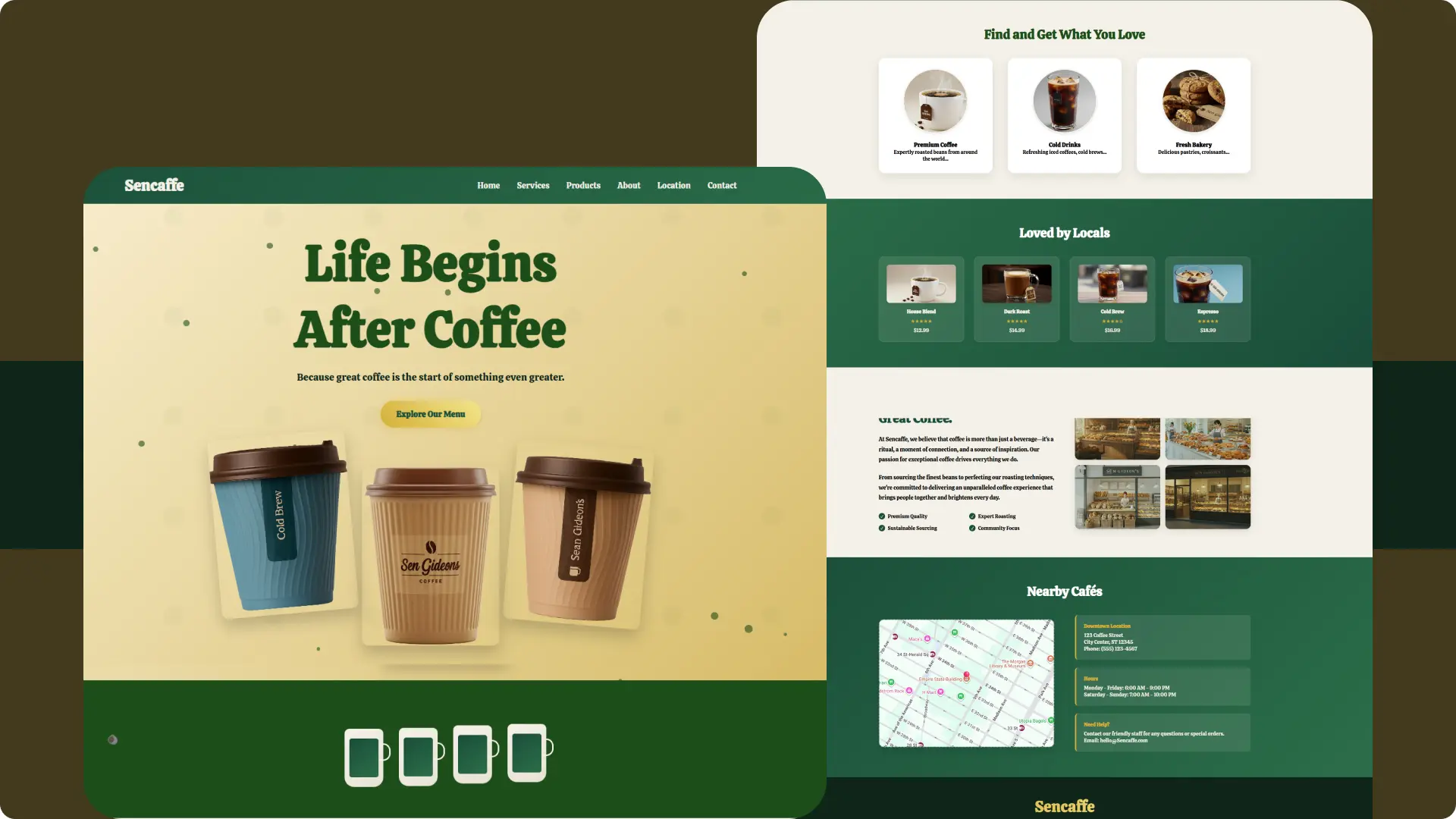
If you’re running a coffee shop or just love web design, you need a site that draws people in. I built this Sencaffe website as a tutorial for my YouTube channel. You can follow along to create your own. This guide walks you through the HTML, CSS, and JavaScript code step by step. By the end, you’ll have a professional landing page ready to launch.
In 2024, over 70% of small businesses like cafes use websites to boost foot traffic, according to Statista. Projections for 2025 show e-commerce integration in food services growing by 15%, per eMarketer. You get real value here, no hype, just code that works.
John Resig, creator of jQuery, once said, “The best way to learn web development is to build something you care about.” That fits this project perfectly.
Planning Your Coffee Shop Website
Start simple. Decide what your site needs. For Sencaffe, I focused on a clean layout to showcase coffee, services, and location. You avoid overload by picking key sections early.
Choosing Your Theme and Fonts
Pick colors that match your brand. I used greens (#1D4E1A) for a fresh coffee feel and golds (#d4af37) for premium vibes. Link to Google Fonts for easy access, grab Calistoga and Inter like in the code.
Check out my basics guide on choosing web colors for more tips. Externally, refer to Google Fonts to test pairings.
Gathering Images and Assets
You need photos of coffee, store interiors, and products. I generated free ones from AI. Organize them in an “assets/images” folder. Lazy loading in HTML speeds things up, add it to imgs as shown.
For stats, 85% of users abandon slow sites in 2024, says Google. Optimize images to under 200KB each.
Building the HTML Structure
HTML sets the bones. Copy the provided code into index.html. You build sections one by one. This creates a semantic, accessible page.
Header and Navigation
Add a fixed header with nav links. Use
- for the menu. The mobile button toggles visibility, key for phones, where 60% of traffic comes from in 2025 forecasts by Oberlo.
- Hero and Services Sections. The hero grabs attention with a big title and coffee images. Stack them responsively. In services, use a grid for cards. Each shows an icon, title, and description. External resource: Learn grids from MDN Web Docs.
- Products and About Sections. Products use a similar grid with ratings and prices. About mixes text and images in a two-column layout. Add features list with check icons.
- Location and Footer. Embed a Google Map iframe for location. Footer includes links, socials, and contact. Use Remix Icons for social buttons, pull from CDN.
HTML
<!DOCTYPE html>
<html lang="en">
<head>
<meta charset="UTF-8">
<meta name="viewport" content="width=device-width, initial-scale=1.0">
<title>Sencaffe - Life Begins After Coffee</title>
<link rel="stylesheet" href="css/styles.css">
<!-- Remix Icons -->
<link
href="https://cdn.jsdelivr.net/npm/remixicon@4.3.0/fonts/remixicon.css"
rel="stylesheet"
/>
<!-- Google Font -->
<link rel="preconnect" href="https://fonts.googleapis.com">
<link rel="preconnect" href="https://fonts.gstatic.com" crossorigin>
<link href="https://fonts.googleapis.com/css2?family=Calistoga&family=Inter:ital,opsz,wght@0,14..32,100..900;1,14..32,100..900&display=swap" rel="stylesheet">
</head>
<body>
<!-- Header -->
<header id="header">
<nav class="container">
<a href="#" class="logo">Sencaffe</a>
<ul class="nav-links" id="navLinks">
<li><a href="#home">Home</a></li>
<li><a href="#services">Services</a></li>
<li><a href="#products">Products</a></li>
<li><a href="#about">About</a></li>
<li><a href="#location">Location</a></li>
<li><a href="#contact">Contact</a></li>
</ul>
<button class="mobile-menu" id="mobileMenu">☰</button>
</nav>
</header>
<!-- Hero Section -->
<section class="hero" id="home">
<div class="container">
<div class="hero-content">
<h1>Life Begins<br>After Coffee</h1>
<p>Because great coffee is the start of something even greater.</p>
<a href="#services" class="cta-button">Explore Our Menu</a>
</div>
<!-- Add this coffee images container -->
<div class="hero-coffee-images">
<div class="coffee-image">
<img src="assets/images/coffee-cup-2.png" alt="Premium Coffee Blend">
</div>
<div class="coffee-image">
<img src="assets/images/coffee-cup.png" alt="Espresso Shot">
</div>
<div class="coffee-image">
<img src="assets/images/coffee-cup-3.png" alt="Cold Brew">
</div>
</div>
</div>
</section>
<!-- Sub Hero Section -->
<section>
<div class="coffee-cups">
<div class="cup floating" style="animation-delay: 0s;"></div>
<div class="cup floating" style="animation-delay: 0.5s;"></div>
<div class="cup floating" style="animation-delay: 1s;"></div>
<div class="cup floating" style="animation-delay: 1.5s;"></div>
</div>
</section>
<!-- Services Section -->
<section class="services" id="services">
<div class="container">
<h2 class="section-title">Find and Get What You Love</h2>
<div class="services-grid">
<div class="service-card">
<div class="service-icon">
<img src="assets/images/premium-coffee.jpg" alt="Premium Coffee" loading="lazy">
</div>
<h3>Premium Coffee</h3>
<p>Expertly roasted beans from around the world...</p>
</div>
<div class="service-card">
<div class="service-icon">
<img src="assets/images/Cold-drinks.jpg" alt="Cold Drinks" loading="lazy">
</div>
<h3>Cold Drinks</h3>
<p>Refreshing iced coffees, cold brews...</p>
</div>
<div class="service-card">
<div class="service-icon">
<img src="assets/images/baked-food.jpg" alt="Fresh Bakery" loading="lazy">
</div>
<h3>Fresh Bakery</h3>
<p>Delicious pastries, croissants...</p>
</div>
</div>
</div>
</section>
<!-- Products Section -->
<section class="products" id="products">
<div class="container">
<h2 class="section-title t-products">Loved by Locals</h2>
<div class="products-grid">
<div class="product-card">
<div class="product-image">
<img src="assets/images/premium-coffee.jpg" alt="House Blend Coffee" loading="lazy">
</div>
<h4>House Blend</h4>
<div class="rating">★★★★★</div>
<p>$12.99</p>
</div>
<div class="product-card">
<div class="product-image">
<img src="assets/images/coffee-2.jpg" alt="Dark Roast Coffee" loading="lazy">
</div>
<h4>Dark Roast</h4>
<div class="rating">★★★★★</div>
<p>$14.99</p>
</div>
<div class="product-card">
<div class="product-image">
<img src="assets/images/coffee-1.jpg" alt="Cold Brew Coffee" loading="lazy">
</div>
<h4>Cold Brew</h4>
<div class="rating">★★★★☆</div>
<p>$16.99</p>
</div>
<div class="product-card">
<div class="product-image">
<img src="assets/images/expresso.jpg" alt="Espresso Coffee" loading="lazy">
</div>
<h4>Espresso</h4>
<div class="rating">★★★★★</div>
<p>$18.99</p>
</div>
</div>
</div>
</section>
<!-- About Section -->
<section class="about" id="about">
<div class="container">
<div class="about-content">
<div class="about-text">
<h2>Good Vibes.<br>Great Coffee.</h2>
<p>At Sencaffe, we believe that coffee is more than just a beverage—it's a ritual, a moment of connection, and a source of inspiration. Our passion for exceptional coffee drives everything we do.</p>
<p>From sourcing the finest beans to perfecting our roasting techniques, we're committed to delivering an unparalleled coffee experience that brings people together and brightens every day.</p>
<div class="about-features">
<div class="feature">
<div class="feature-icon"></div>
<span>Premium Quality</span>
</div>
<div class="feature">
<div class="feature-icon"></div>
<span>Expert Roasting</span>
</div>
<div class="feature">
<div class="feature-icon"></div>
<span>Sustainable Sourcing</span>
</div>
<div class="feature">
<div class="feature-icon"></div>
<span>Community Focus</span>
</div>
</div>
</div>
<div class="about-images">
<div class="about-image">
<img src="assets/images/store-1.jpg" alt="Fresh coffee beans" loading="lazy">
</div>
<div class="about-image">
<img src="assets/images/store-2.jpg" loading="lazy">
</div>
<div class="about-image">
<img src="assets/images/store-3.jpg" alt="Cafe interior" loading="lazy">
</div>
<div class="about-image">
<img src="assets/images/store-4.jpg" alt="arista at work" loading="lazy">
</div>
</div>
</div>
</div>
</section>
<!-- Location Section -->
<section class="location" id="location">
<div class="container">
<h2 class="section-title t-products">Nearby Cafés</h2>
<div class="location-content">
<div class="map-container">
<iframe
src="https://www.google.com/maps/embed?pb=!1m18!1m12!1m3!1d3022.2152091795357!2d-73.9878449245257!3d40.74844047138971!2m3!1f0!2f0!3f0!3m2!1i1024!2i768!4f13.1!3m3!1m2!1s0x89c259a9b3117469%3A0xd134e199a405a163!2sEmpire%20State%20Building!5e0!3m2!1sen!2sus!4v1712345678901!5m2!1sen!2sus"
width="600"
height="450"
style="border:0;"
allowfullscreen=""
loading="lazy"
referrerpolicy="no-referrer-when-downgrade"
aria-label="Google Maps location of our cafe">
</iframe>
</div>
<div class="location-info">
<div class="info-card">
<h4>Downtown Location</h4>
<p>123 Coffee Street<br>City Center, ST 12345</p>
<p>Phone: (555) 123-4567</p>
</div>
<div class="info-card">
<h4>Hours</h4>
<p>Monday - Friday: 6:00 AM - 9:00 PM<br>
Saturday - Sunday: 7:00 AM - 10:00 PM</p>
</div>
<div class="info-card">
<h4>Need Help?</h4>
<p>Contact our friendly staff for any questions or special orders.</p>
<p>Email: hello@Sencaffe.com</p>
</div>
</div>
</div>
</div>
</section>
<!-- Footer -->
<footer id="contact">
<div class="container">
<div class="brand-footer">Sencaffe</div>
<div class="footer-content">
<div class="footer-section">
<h3>About Sencaffe</h3>
<p>We're passionate about bringing you the finest coffee experience, from bean to cup. Join our community of coffee lovers and discover what makes every sip special.</p>
<div class="social-links">
<a href="#" class="social-link" aria-label="Facebook">
<i class="ri-facebook-fill"></i>
</a>
<a href="#" class="social-link" aria-label="Twitter">
<i class="ri-twitter-x-fill"></i>
</a>
<a href="#" class="social-link" aria-label="Instagram">
<i class="ri-instagram-fill"></i>
</a>
</div>
</div>
<div class="footer-section">
<h3>Quick Links</h3>
<a href="#home">Home</a>
<a href="#services">Our Menu</a>
<a href="#products">Products</a>
<a href="#about">About Us</a>
<a href="#location">Locations</a>
</div>
<div class="footer-section">
<h3>Contact Info</h3>
<p>123 Coffee Street, City Center</p>
<p>(555) 123-4567</p>
<p>hello@Sencaffe.com</p>
<p>Open Daily 6AM - 10PM</p>
</div>
<div class="footer-section">
<h3>Newsletter</h3>
<p>Stay updated with our latest blends, events, and special offers.</p>
<a href="#" class="cta-button" style="margin-top: 1rem;">Subscribe Now</a>
</div>
</div>
<div class="footer-bottom">
<p>© 2025 Sencaffe Coffee. All rights reserved.</p>
</div>
</div>
</footer>
<script src="js/script.js"></script>
</body>
</html>
Styling with CSS
CSS brings it to life. Paste into styles.css. You control layout, colors, and effects.
Global and Header Styles
Reset margins with * selector. Style the header with gradients. Add scroll effects for a sticky feel.
In 2024, gradient backgrounds rose 25% in popularity, per CSS-Tricks surveys.
Hero and Animation Styles
Hero uses overlays and floating images. Add keyframes for fadeInUp. Hover effects scale images.
Quote from Rachel Andrew, CSS expert: “Grids make responsive design straightforward, use them everywhere.”
Section-Specific Styles
Services cards get shadows and pulses. Products add shine on hover. About uses feature icons. Location styles the map with borders.
Dive into CSS-Tricks for advanced hovers.
Responsive Media Queries
Break at 768px and 480px. Stack grids into columns. Adjust hero heights.
CSS
* {
    margin: 0;
    padding: 0;
    box-sizing: border-box;
}

body {
    font-family: "Calistoga", serif;
    overflow-x: hidden;
    background: #1D4E1A;
}

.container {
    max-width: 1200px;
    margin: 0 auto;
    padding: 0 20px;
}

/* Header */
header {
    background: linear-gradient(135deg, #1a4d3a 0%, #2c6e49 100%);
    color: #f4f1e8;
    padding: 1rem 0;
    position: fixed;
    width: 100%;
    top: 0;
    z-index: 1000;
    transition: all 0.3s ease;
}

header.scrolled {
    background: rgba(26, 77, 58, 0.95);
    backdrop-filter: blur(10px);
}

nav {
    display: flex;
    justify-content: space-between;
    align-items: center;
}

.logo {
    font-size: 1.8rem;
    font-weight: bold;
    text-decoration: none;
    color: #f4f1e8;
}

.nav-links {
    display: flex;
    list-style: none;
    gap: 2rem;
}

.nav-links a {
    color: #f4f1e8;
    text-decoration: none;
    transition: color 0.3s ease;
}

.nav-links a:hover {
    color: #d4af37;
}

.mobile-menu {
    display: none;
    background: none;
    border: none;
    color: #f4f1e8;
    font-size: 1.5rem;
    cursor: pointer;
}

/* Hero Section */
.hero {
    background: linear-gradient(135deg, #FCF3D9 0%, #d4b861 100%);
    color: #f4f1e8;
    padding: 120px 0 80px;
    text-align: center;
    position: relative;
    overflow: hidden;
    height: 100vh;
}

.hero::before {
    content: '';
    position: absolute;
    top: 0;
    left: 0;
    right: 0;
    bottom: 0;
    background: url('data:image/svg+xml,<svg xmlns="http://www.w3.org/2000/svg" viewBox="0 0 100 100"><defs><pattern id="coffee-beans" x="0" y="0" width="20" height="20" patternUnits="userSpaceOnUse"><circle cx="10" cy="10" r="2" fill="rgba(29, 78, 26, 0.1)"/></pattern></defs><rect width="100" height="100" fill="url(%23coffee-beans)"/></svg>');
    opacity: 0.3;
}

.hero-content {
    position: relative;
    z-index: 2;
}

.hero h1 {
    font-size: 6rem;
    margin-bottom: 1rem;
    color: #1D4E1A;
}

.hero p {
    font-size: 1.2rem;
    margin-bottom: 2rem;
    color: #0f2419;
    opacity: 0;
    transform: translateY(30px);
    animation: fadeInUp 1s ease 0.5s forwards;

}

.cta-button {
    display: inline-block;
    background: linear-gradient(45deg, #d4af37, #f4e68c);
    color: #1a4d3a;
    padding: 15px 30px;
    text-decoration: none;
    cursor: pointer;
    border-radius: 50px;
    font-weight: bold;
    transition: all 0.3s ease;
    box-shadow: 0 4px 15px rgba(212, 175, 55, 0.3);
}

.cta-button:hover {
    transform: translateY(-2px);
    box-shadow: 0 8px 25px rgba(212, 175, 55, 0.4);
}

.hero-coffee-images {
    position: absolute;
    right: 0;
    width: 100%;
    height: 100%;
    display: flex;
    align-items: center;
    justify-content: center;
    gap: 20px;
    z-index: 2;
    margin-top: -250px;
}

.coffee-image {
    width: 260px;
    height: 340px;
    position: relative;
    transition: all 0.4s ease;
}

.coffee-image img {
    width: 100%;
    height: 100%;
    object-fit: cover;
    border-radius: 12px;
    box-shadow: 0 15px 30px rgba(0,0,0,0.2);
    transition: transform 0.4s ease;
}


.coffee-cups {
    display: flex;
    justify-content: center;
    gap: 2rem;
    animation: fadeInUp 1s ease 1.1s forwards;
    background: #1D4E1A;
    margin-bottom: 4rem;
}

.cup {
    width: 80px;
    height: 120px;
    background: linear-gradient(145deg, #f4f1e8, #e8e2d4);
    border-radius: 10px 10px 20px 20px;
    position: relative;
    transition: transform 0.3s ease;
    cursor: pointer;
}

.cup:hover {
    transform: translateY(-10px) rotate(5deg);
}

.cup::before {
    content: '';
    position: absolute;
    top: 20px;
    left: 50%;
    transform: translateX(-50%);
    width: 60px;
    height: 80px;
    background: linear-gradient(145deg, #1a4d3a, #2c6e49);
    border-radius: 5px;
}

.cup::after {
    content: '';
    position: absolute;
    top: 30px;
    right: -15px;
    width: 20px;
    height: 30px;
    border: 3px solid #f4f1e8;
    border-left: none;
    border-radius: 0 15px 15px 0;
}


/* Positioning each image differently */
.coffee-image:nth-child(1) {
    transform: translateY(-40px) rotate(-5deg);
}

.coffee-image:nth-child(2) {
    transform: translateY(20px);
    z-index: 2;
}

.coffee-image:nth-child(3) {
    transform: translateY(-20px) rotate(5deg);
}

/* Hover effects */
.coffee-image:hover {
    transform: translateY(-10px) !important;
}

.coffee-image:hover img {
    transform: scale(1.05);
}


/* Responsive adjustments */
@media (max-width: 768px) {

    .hero-coffee-images {
        position: relative;
        width: 100%;
        justify-content: center;
        margin-top: 40px;
    }

    .coffee-image {
        width: 120px;
        height: 160px;
    }
}

/* Services Section */
.services {
    padding: 80px 0;
    background: #f4f1e8;
}

.section-title {
    text-align: center;
    font-size: 2.5rem;
    margin-bottom: 3rem;
    color: #1D4E1A;
}

.services-grid {
    display: grid;
    grid-template-columns: repeat(auto-fit, minmax(250px, 1fr));
    gap: 3rem;
    margin-top: 3rem;
}

.service-card {
    background: white;
    padding: 2rem;
    border-radius: 20px;
    text-align: center;
    box-shadow: 0 10px 30px rgba(0,0,0,0.1);
    transition: all 0.3s ease;
    border: 2px solid transparent;
}

.service-card:hover {
    transform: translateY(-10px);
    box-shadow: 0 20px 40px rgba(0,0,0,0.15);
    border-color: #d4af37;
}


.service-icon {
    width: 200px;
    height: 200px;
    background: linear-gradient(135deg, #1a4d3a, #2c6e49);
    border-radius: 50%;
    margin: 0 auto 1.5rem;
    display: flex;
    align-items: center;
    justify-content: center;
    overflow: hidden; /* Ensures images stay circular */
    border: 3px solid #f4f1e8;
    box-shadow: 0 4px 8px rgba(0,0,0,0.1);
    transition: all 0.3s ease;
}

.service-icon img {
    width: 100%;
    height: 100%;
    object-fit: cover;
    transition: transform 0.3s ease;
}

/* Hover effects */
.service-card:hover .service-icon {
    transform: rotate(15deg) scale(1.1);
    border-color: #d4af37;
}

.service-card:hover .service-icon img {
    transform: scale(1.1);
}

/* Add pulse animation for attention */
@keyframes pulse {
    0% { transform: scale(1); }
    50% { transform: scale(1.1); }
    100% { transform: scale(1); }
}

.service-icon {
    animation: pulse 3s ease-in-out infinite;
}

.service-card:nth-child(2) .service-icon {
    animation-delay: 0.3s;
}

.service-card:nth-child(3) .service-icon {
    animation-delay: 0.6s;
}
/* Products Section */
.products {
    padding: 80px 0;
    background: linear-gradient(135deg, #2c6e49 0%, #1a4d3a 100%);
    color: #f4f1e8;
}

.products-grid {
    display: grid;
    grid-template-columns: repeat(auto-fit, minmax(200px, 1fr));
    gap: 2rem;
    margin-top: 3rem;
}

.t-products{
    color:#ffffff;
}

.product-card {
    background: rgba(244, 241, 232, 0.1);
    padding: 1.5rem;
    border-radius: 15px;
    text-align: center;
    transition: all 0.3s ease;
    border: 1px solid rgba(244, 241, 232, 0.2);
}

.product-card:hover {
    background: rgba(244, 241, 232, 0.2);
    transform: scale(1.05);
}

.product-image {
    width: 100%;
    height: 120px;
    margin: 0 auto 1rem;
    position: relative;
    overflow: hidden;
    border-radius: 10px;
    box-shadow: 0 4px 8px rgba(0,0,0,0.1);
    transition: all 0.3s ease;
}

.product-image img {
    width: 100%;
    height: 100%;
    object-fit: cover;
    transition: transform 0.5s ease;
}

/* Add these new styles for product interaction */
.product-card:hover .product-image {
    transform: translateY(-5px);
    box-shadow: 0 8px 15px rgba(0,0,0,0.2);
}

.product-card:hover .product-image img {
    transform: scale(1.05);
}

/* Add a subtle shine effect on hover */
.product-image::after {
    content: '';
    position: absolute;
    top: 0;
    left: -100%;
    width: 50%;
    height: 100%;
    background: linear-gradient(
        to right,
        rgba(255,255,255,0) 0%,
        rgba(255,255,255,0.3) 50%,
        rgba(255,255,255,0) 100%
    );
    transition: all 0.5s ease;
}

.product-card:hover .product-image::after {
    left: 100%;
}

/* Responsive adjustments */
@media (max-width: 768px) {
    .product-image {
        height: 100px;
    }
}

.rating {
    color: #d4af37;
    margin: 0.5rem 0;
}

/* About Section */
.about {
    padding: 80px 0;
    background: #f4f1e8;
}

.about-content {
    display: grid;
    grid-template-columns: 1fr 1fr;
    gap: 4rem;
    align-items: center;
}

.about-text h2 {
    font-size: 2.5rem;
    margin-bottom: 1.5rem;
    color: #1a4d3a;
}

.about-text p {
    margin-bottom: 1.5rem;
    font-size: 1.1rem;
    line-height: 1.8;
}

.about-features {
    display: grid;
    grid-template-columns: 1fr 1fr;
    gap: 1rem;
    margin-top: 2rem;
}

.feature {
    display: flex;
    align-items: center;
    gap: 0.5rem;
}

.feature-icon {
    width: 20px;
    height: 20px;
    background: #1a4d3a;
    border-radius: 50%;
    position: relative;
}

.feature-icon::after {
    content: '✓';
    position: absolute;
    top: 50%;
    left: 50%;
    transform: translate(-50%, -50%);
    color: white;
    font-size: 12px;
}

.about-images {
    display: grid;
    grid-template-columns: 1fr 1fr;
    gap: 1rem;
}

/* Replace existing .image-placeholder styles with these */
.about-images {
    display: grid;
    grid-template-columns: 1fr 1fr;
    gap: 1rem;
}

.about-image {
    height: 200px;
    border-radius: 15px;
    position: relative;
    overflow: hidden;
    box-shadow: 0 8px 20px rgba(0,0,0,0.1);
    transition: all 0.4s ease;
}

.about-image img {
    width: 100%;
    height: 100%;
    object-fit: cover;
    transition: transform 0.5s ease;
}

/* Hover effects */
.about-image:hover {
    transform: translateY(-5px);
    box-shadow: 0 12px 25px rgba(0,0,0,0.15);
}

.about-image:hover img {
    transform: scale(1.05);
}

/* Grid layout adjustments */
.about-image:nth-child(1) {
    grid-column: 1;
    grid-row: 1 / span 1;
}

.about-image:nth-child(2) {
    grid-column: 2;
    grid-row: 1 / span 1;
}

.about-image:nth-child(3) {
    grid-column: 1;
    grid-row: 2 / span 1;
}

.about-image:nth-child(4) {
    grid-column: 2;
    grid-row: 2 / span 1;
}

/* Overlay effect */
.about-image::after {
    content: '';
    position: absolute;
    top: 0;
    left: 0;
    right: 0;
    bottom: 0;
    background: rgba(26, 77, 58, 0.2);
    transition: all 0.3s ease;
}

.about-image:hover::after {
    background: rgba(26, 77, 58, 0);
}

/* Responsive adjustments */
@media (max-width: 768px) {
    .about-images {
        grid-template-columns: 1fr;
    }

    .about-image {
        height: 150px;
    }

    .about-image:nth-child(n) {
        grid-column: 1;
        grid-row: auto;
    }
}

/* Location Section */
.location {
    padding: 80px 0;
    background: linear-gradient(135deg, #1a4d3a 0%, #2c6e49 100%);
    color: #f4f1e8;
}

.location-content {
    display: grid;
    grid-template-columns: 1fr 1fr;
    gap: 4rem;
    align-items: center;
}

.map-container {
    height: 400px;
    width: 100%;
    border-radius: 15px;
    overflow: hidden;
    box-shadow: 0 10px 30px rgba(0,0,0,0.1);
    position: relative;
    border: 2px dashed rgba(244, 241, 232, 0.3);
}

.map-container iframe {
    width: 100%;
    height: 100%;
    border: none;
    filter: grayscale(20%) sepia(10%) hue-rotate(100deg);
    transition: all 0.3s ease;
}

.map-container:hover iframe {
    filter: grayscale(0%) sepia(0%) hue-rotate(0deg);
}

.map-container::before {
    content: '📍';
    position: absolute;
    top: 50%;
    left: 50%;
    transform: translate(-50%, -100%);
    font-size: 2rem;
    z-index: 10;
    animation: bounce 2s infinite;
}

.location-info {
    display: grid;
    gap: 1.5rem;
}

.info-card {
    background: rgba(244, 241, 232, 0.1);
    padding: 1.5rem;
    border-radius: 10px;
    border-left: 4px solid #d4af37;
}

.info-card h4 {
    margin-bottom: 0.5rem;
    color: #d4af37;
}

/* Footer */
footer {
    background: #0f2419;
    color: #f4f1e8;
    padding: 60px 0 20px;
}

.footer-content {
    display: grid;
    grid-template-columns: repeat(auto-fit, minmax(250px, 1fr));
    gap: 3rem;
    margin-bottom: 2rem;
}

.footer-section h3 {
    margin-bottom: 1rem;
    color: #d4af37;
}

.footer-section p,
.footer-section a {
    color: #f4f1e8;
    text-decoration: none;
    margin-bottom: 0.5rem;
    display: block;
}

.footer-section a:hover {
    color: #d4af37;
}


.social-links {
    display: flex;
    gap: 1rem;
    margin-top: 1rem;
}

.social-link {
    width: 40px;
    height: 40px;
    background: #1a4d3a;
    border-radius: 50%;
    display: flex;
    align-items: center;
    justify-content: center;
    transition: all 0.3s ease;
    color: #f4f1e8;
    font-size: 1.2rem;
    text-decoration: none;
}

.social-link:hover {
    background: #d4af37;
    transform: translateY(-3px) scale(1.1);
    box-shadow: 0 5px 15px rgba(212, 175, 55, 0.4);
}

/* Specific icon adjustments */
.social-link i {
    transition: transform 0.3s ease;
}

.social-link:hover i {
    transform: scale(1.2);
}

/* Responsive adjustments */
@media (max-width: 768px) {
    .social-links {
        justify-content: center;
    }

    .social-link {
        width: 36px;
        height: 36px;
        font-size: 1rem;
    }
}

.footer-bottom {
    text-align: center;
    padding-top: 2rem;
    border-top: 1px solid #1a4d3a;
    color: #a0a0a0;
}

.brand-footer {
    font-size: 3rem;
    font-weight: bold;
    text-align: center;
    margin-bottom: 2rem;
    background: linear-gradient(45deg, #d4af37, #f4e68c);
    -webkit-background-clip: text;
    -webkit-text-fill-color: transparent;
    background-clip: text;
}

/* Animations */
@keyframes fadeInUp {
    to {
        opacity: 1;
        transform: translateY(0);
    }
}

@keyframes float {
    0%, 100% { transform: translateY(0px); }
    50% { transform: translateY(-10px); }
}

.floating {
    animation: float 3s ease-in-out infinite;
}

/* Responsive Design */
@media (max-width: 768px) {
    .nav-links {
        display: none;
        position: absolute;
        top: 100%;
        left: 0;
        width: 100%;
        background: #1a4d3a;
        flex-direction: column;
        padding: 1rem;
    }

    .nav-links.active {
        display: flex;
    }

    .mobile-menu {
        display: block;
    }
    .hero {
        height: 80vh;
    }

    .hero h1 {
        font-size: 2.5rem;
    }

    .coffee-cups {
        flex-wrap: wrap;
        gap: 1rem;
    }

    .cup {
        width: 60px;
        height: 90px;
    }

    .services-grid,
    .products-grid {
        grid-template-columns: 1fr;
    }

    .about-content,
    .location-content {
        grid-template-columns: 1fr;
        gap: 2rem;
    }

    .about-features {
        grid-template-columns: 1fr;
    }

    .footer-content {
        grid-template-columns: 1fr;
        text-align: center;
    }
}

@media (max-width: 480px) {
    .hero h1 {
        font-size: 2rem;
    }

    .section-title {
        font-size: 2rem;
    }

    .container {
        padding: 0 15px;
    }
}
Adding JavaScript Interactivity
JS adds polish. Put in script.js. You handle menus, scrolls, and effects.
Mobile Menu and Scroll Effects
Toggle nav on click. Add scrolled class to header on scroll.
Smooth Scrolling and Observers
Prevent default on anchors for smooth scroll. Use IntersectionObserver to fade in elements.
Interactive Elements and Effects
Add hovers to cups and products. Create floating beans and a progress bar.
Reference JavaScript.info for observers.
Loading and Typing Animations
Fade in body on load. Type out hero text.
JAVASCRIPT
  // Mobile Menu Toggle
const mobileMenu = document.getElementById('mobileMenu');
const navLinks = document.getElementById('navLinks');

mobileMenu.addEventListener('click', () => {
    navLinks.classList.toggle('active');
});

// Header Scroll Effect
const header = document.getElementById('header');

window.addEventListener('scroll', () => {
    if (window.scrollY > 100) {
        header.classList.add('scrolled');
    } else {
        header.classList.remove('scrolled');
    }
});

// Smooth Scrolling for Navigation Links
document.querySelectorAll('a[href^="#"]').forEach(anchor => {
    anchor.addEventListener('click', function (e) {
        e.preventDefault();
        const target = document.querySelector(this.getAttribute('href'));
        if (target) {
            target.scrollIntoView({
                behavior: 'smooth',
                block: 'start'
            });
        }
        // Close mobile menu after clicking
        navLinks.classList.remove('active');
    });
});

// Intersection Observer for Animation Triggers
const observerOptions = {
    threshold: 0.1,
    rootMargin: '0px 0px -50px 0px'
};

const observer = new IntersectionObserver((entries) => {
    entries.forEach(entry => {
        if (entry.isIntersecting) {
            entry.target.style.opacity = '1';
            entry.target.style.transform = 'translateY(0)';
        }
    });
}, observerOptions);

// Observe elements for scroll animations
document.querySelectorAll('.service-card, .product-card, .about-text, .about-images').forEach(el => {
    el.style.opacity = '0';
    el.style.transform = 'translateY(30px)';
    el.style.transition = 'all 0.6s ease';
    observer.observe(el);
});

// Interactive Coffee Cups
document.querySelectorAll('.cup').forEach((cup, index) => {
    cup.addEventListener('mouseenter', () => {
        cup.style.transform = 'translateY(-15px) rotate(10deg) scale(1.1)';
    });

    cup.addEventListener('mouseleave', () => {
        cup.style.transform = 'translateY(0) rotate(0deg) scale(1)';
    });

    // Add click effect
    cup.addEventListener('click', () => {
        cup.style.animation = 'none';
        setTimeout(() => {
            cup.style.animation = `float 3s ease-in-out infinite ${index * 0.5}s`;
        }, 100);
    });
});

// Product Cards Hover Effects
document.querySelectorAll('.product-card').forEach(card => {
    card.addEventListener('mouseenter', () => {
        card.style.transform = 'scale(1.05) translateY(-10px)';
        card.style.boxShadow = '0 15px 30px rgba(212, 175, 55, 0.3)';
    });

    card.addEventListener('mouseleave', () => {
        card.style.transform = 'scale(1) translateY(0)';
        card.style.boxShadow = 'none';
    });
});

// Dynamic Background Effect
function createFloatingElements() {
    const hero = document.querySelector('.hero');

    for (let i = 0; i < 20; i++) {
        const element = document.createElement('div');
        element.style.position = 'absolute';
        element.style.width = Math.random() * 10 + 5 + 'px';
        element.style.height = element.style.width;
        element.style.background = 'rgb(29, 78, 26, 0.6)';
        element.style.borderRadius = '50%';
        element.style.left = Math.random() * 100 + '%';
        element.style.top = Math.random() * 100 + '%';
        element.style.animation = `float ${Math.random() * 3 + 2}s ease-in-out infinite`;
        element.style.animationDelay = Math.random() * 2 + 's';
        hero.appendChild(element);
    }
}

// Initialize floating elements
createFloatingElements();

// Add parallax effect to hero section
window.addEventListener('scroll', () => {
    const scrolled = window.pageYOffset;
    const hero = document.querySelector('.hero');
    const rate = scrolled * -0.5;

    if (hero) {
        hero.style.transform = `translateY(${rate}px)`;
    }
});

// Add loading animation
window.addEventListener('load', () => {
    document.body.style.opacity = '0';
    document.body.style.transition = 'opacity 0.5s ease';
    setTimeout(() => {
        document.body.style.opacity = '1';
    }, 100);
});

// Add typing effect to hero title
function typeWriter(element, text, speed = 100) {
    let i = 0;
    element.innerHTML = '';

    function type() {
        if (i < text.length) {
            element.innerHTML += text.charAt(i);
            i++;
            setTimeout(type, speed);
        }
    }
    type();
}

// Initialize typing effect after page load
setTimeout(() => {
    const heroTitle = document.querySelector('.hero p');
    if (heroTitle) {
        typeWriter(heroTitle, 'Because great coffee is the start of something even greater.', 80);
    }
}, 1500);

// Add interactive star rating for products
document.querySelectorAll('.rating').forEach(rating => {
    rating.addEventListener('click', (event) => {
        const stars = rating.innerHTML;
        rating.style.transform = 'scale(1.2)';
        rating.style.color = '#f4e68c';

        setTimeout(() => {
            rating.style.transform = 'scale(1)';
            rating.style.color = '#d4af37';
        }, 200);
    });
});

// Add scroll progress indicator
function createScrollIndicator() {
    const indicator = document.createElement('div');
    indicator.style.position = 'fixed';
    indicator.style.top = '0';
    indicator.style.left = '0';
    indicator.style.width = '0%';
    indicator.style.height = '3px';
    indicator.style.background = 'linear-gradient(45deg, #d4af37, #f4e68c)';
    indicator.style.zIndex = '9999';
    indicator.style.transition = 'width 0.3s ease';
    document.body.appendChild(indicator);

    window.addEventListener('scroll', () => {
        const winScroll = document.body.scrollTop || document.documentElement.scrollTop;
        const height = document.documentElement.scrollHeight - document.documentElement.clientHeight;
        const scrolled = (winScroll / height) * 100;
        indicator.style.width = scrolled + '%';
    });
}

createScrollIndicator();


// Add festive elements (coffee beans falling)
function createFallingBeans() {
    function createBean() {
        const bean = document.createElement('div');
        bean.innerHTML = '☕';
        bean.style.position = 'fixed';
        bean.style.top = '-50px';
        bean.style.left = Math.random() * window.innerWidth + 'px';
        bean.style.fontSize = Math.random() * 20 + 10 + 'px';
        bean.style.opacity = Math.random() * 0.5 + 0.2;
        bean.style.pointerEvents = 'none';
        bean.style.zIndex = '1';
        bean.style.animation = `fall ${Math.random() * 3 + 2}s linear`;

        document.body.appendChild(bean);

        setTimeout(() => {
            bean.remove();
        }, 5000);
    }

    // Create falling beans every few seconds
    setInterval(createBean, 2000);
}

// Add CSS for falling animation
const fallingStyle = document.createElement('style');
fallingStyle.textContent = `
    @keyframes fall {
        to {
            transform: translateY(calc(100vh + 50px)) rotate(360deg);
        }
    }
`;
document.head.appendChild(fallingStyle);

// Start falling beans effect
setTimeout(createFallingBeans, 2000);
You can download the full source code below
Optimizing and Deploying Your Site
Test on devices. Minify CSS/JS, tools like Minifier.org help. Host on GitHub Pages or Netlify.
In 2025, Core Web Vitals will impact 40% more SEO rankings, per Search Engine Journal.
FAQ
How do I make a coffee shop website?
You start with HTML for structure, add CSS for style, and JS for interactions. Follow this guide to build sections like hero and products.
What is the best platform to build a cafe website?
Use HTML/CSS/JS for custom control, or WordPress for ease. Custom sites load faster, key for mobile users.
How much does it cost to build a coffee shop website?
Basic ones cost $0 with free tools like GitHub. Professional designs run $500-$2000.
What should a coffee shop website include?
Include menu, location, about, products, and contact. Add maps and social links.
How do I add e-commerce to my cafe site?
Integrate Stripe or Shopify. Start with product grids like in this tutorial.
Is responsive design necessary for cafe websites?
Yes, over 50% of searches are mobile. Use media queries to adapt layouts.
Disclaimer
Sengideons.com does not host any files on its servers. All point to content hosted on third-party websites. Sengideons.com does not accept responsibility for content hosted on third-party websites and does not have any involvement in the same.